Unblur image free & automatic
Unblur image online for free: PicReviver's AI turns a soft, blurry image into a sharper one and can enlarge it up to 4× in the same pass, 5 photos at a time, no account, no watermark.
An image clarity enhancer not just a sharpen filter.
By Sam Ridder · Last updated: October 2026
You get the real result, not a blurry preview. Free means the full-size restored photo: the same file a paid tool would sell you.
Deblurring is rebuilding, not just sharpening
A classic "sharpen" slider only boosts the contrast around edges that are already there, which is why over-sharpening looks harsh and full of halos. PicReviver works differently: an image model trained on millions of photos predicts the fine detail a blurry image lost, so a face, some text or a texture comes out looking resolved rather than just crunchy.
- Rebuilds real edges and texture instead of faking contrast
- No harsh halos or that over-processed, plastic look
- Works on photos, scans and screenshots of photos
- Handles JPG, PNG, WEBP, HEIC/HEIF, TIFF, BMP and GIF
In short, an image deblurrer worth using redraws the missing detail from what is left in the file instead of subtracting blur with a filter. That is what this page runs, and it is also why a hopelessly smeared shot still only gets a plausible guess.
Faces can look different after AI sharpening. If a face looks wrong, try Restore Face or check the before/after slider. When you check a face unblur result, look at the eyes first: if they look sharp but not like the person, the model has guessed too much.
The model behind this ai unblur image pass was trained on millions of photos to predict missing texture, not just boost existing contrast. That is the real difference between an image unblur ai model and a sharpen slider: the slider can only fake sharpness with contrast, while the model draws the edges and texture it expects under the blur, because it has seen what sharp skin, hair and text look like. The biggest gain from ai photo unblur comes on low-resolution and compressed images, where the model can rebuild texture; a long motion streak leaves it very little to work with. It runs on our own GPUs, so the heavy lifting happens on our servers rather than on your device, and an old phone gets the same result as a new desktop.
How to unblur an image
There's nothing to configure. Drop the image in, the model runs on our GPU, and you compare the result with a before/after slider before downloading. If the image is also small, unblurring and upscaling happen in the same pass, so you get a bigger and sharper copy at once. The free tier takes up to five photos per run (ten once Studio mode unlocks) and ten runs a day, with no account, no card and no watermark. Each photo in a batch gets its own pass through the model, and the result comes back at up to 8000 pixels on the long side. Screenshots and scans work the same way as camera photos. After you unblur the image, drag the slider across faces and any text first, since those are where invented detail is easiest to spot.
- Open PicReviver and drop the blurry image in.
- Let the AI rebuild the sharp detail on our GPU (usually seconds).
- Slide the handle to compare before and after.
- Pick your output size and download; the image is then wiped.
When it works best (and when it won't)
Be realistic about what unblurring can fix. The model has learned from millions of photos what sharp edges and textures look like, and it redraws your image from what is still visible under the blur. Where the blur is light (soft focus, a little camera shake, a slightly missed shot) the redrawn detail lands close to what the camera saw. Where little is left, the fine detail it adds is a plausible guess, not your original: strands of hair, skin texture or small letters can look sharp without being exactly what was there. It isn't a clone-stamp tool, so a face reduced to a smear of a few pixels stays a smear; the model needs some real information to work from. Can I unblur a photo taken on an old phone? Yes. Old phone photos are usually small and compressed as well as soft, which is the case the tool handles best: pick 4× and it enlarges while it rebuilds detail.
Read more
- Focus miss: the camera locked onto the wrong spot, so the subject is soft while the background stays sharp
- Camera shake: a slow shutter smeared the whole frame slightly
- Low resolution: the image is simply too small, so it looks soft at a larger size
- Compression and old scans: heavy JPEG or a soft scan flattened the fine detail
In practice, expect a real improvement on soft, low-resolution or lightly blurred images, and lower your expectations for a badly smeared one. To remove blur from image files caused by motion or a missed focus, the model redraws the edges the blur smeared away: light smearing comes back convincingly, a long motion streak usually doesn't. It treats the compression blocks in an old scan the same way, as missing texture to fill in, so you can clear up blurry image detail from a scan too. Asking any tool to clear blur image detail that was never recorded is asking for a guess, and the result will look like one. Want a 4K file? A photo at least 960 pixels wide comes back 3840 pixels wide or more. Curious how all of this works? We wrote an explainer on how AI photo restoration works.
Unblur a photo: free, no account
Everything on this page is free to use: you can unblur photo free of charge, five at a time, with no card and no account. The same goes for scans and screenshots, so you can unblur picture free one by one or unblur pictures free in a batch, and photo unblur free results never carry a watermark. Nothing is installed either: pic unblur online happens in the browser tab you already have open, while the model runs on our server. This is a photo AI free to use without signing up; no account is created and no e-mail is asked for.
A run takes three steps: upload, wait a few seconds, download. You can unblur photo online free from a desktop or a phone with the same result, because the work happens on the server. To unblur pictures online free in a batch, add up to five at once and each one gets its own pass. When you unblur images ai free here, the output can also be up to 4× larger at no extra cost, capped at 8000 pixels on the long side, and when you unblur image online free, nothing lingers afterwards: the upload and the result are both wiped within 45 minutes. The unblur image ai free tier and a paid pass run the same model at the same quality; a pass only raises the batch size, the daily limit and the size ceiling. An ai unblur images batch on the free tier holds five photos, or ten once Studio mode unlocks. If you unblur image free online on a slow connection, the only wait is the upload itself.
Related: Rotate an Image Online Free: 90°, 180°, No Upload.
Have a blurry clip instead of a photo? Our sister site VideoBGNinja has the video version.
Fixing "blurry", and why an AI unblur beats a filter
A blur photo fix takes one button here, and you use it to fix fuzzy photos too. A one-click unblur picture filter in a basic editor only raises contrast along edges that are already there; it cannot bring back detail that softness erased. An ai image unblur pass instead redraws the missing texture, which is why it helps on a soft face or a blurry street sign where a normal filter mostly makes the noise more visible. The unblur image ai model treats a phone photo, a scan and a screenshot the same way, and it does not care about the subject: portraits, landscapes and product shots all go through the same pass. To unblur a picture that is merely soft or slightly out of focus usually gives a properly sharp result; a heavily smeared one improves but stays limited, and you get a clear image only when enough of the original survived.
Unblur text in an image
Blurry text is its own case. Usually it is a text image such as a screenshot, a photo of a whiteboard or a scanned page where the letters have turned mushy. The tool can sharpen text that is merely soft or small, and lettering often becomes readable again. Be careful with what you get back, though: the model draws letter shapes that fit the blur, so on very small or very soft text it can produce sharp-looking letters that are wrong. Check anything that matters, such as a number or a name, against the original. To unblur image text from a document scan, the same free pass applies. Blurred text that was hidden on purpose, like a redacted name or a blurred number plate, is gone from the file, and no tool, ours included, can read back words that were never captured.
If the blur is on a scanned document rather than a photo, the fix is different: ScanReviver's enhance scanned document straightens, crops and brightens the page in one pass instead.
How it works
Three steps, and nothing to configure. The tool sits at the top of this page; everything below explains what it does with your photo.
- Drop the blurry photo in. Drag it onto the tool above, or click to pick a file. JPG, PNG, WEBP, HEIC/HEIF, TIFF, BMP and GIF all work, up to 99 MB and about 45 megapixels per photo, and you can queue 5 photos at a time for free.
- The AI rebuilds the sharp detail. Your photo is processed on our own servers, on our own graphics cards, where the model reconstructs the edges and texture the blur ate instead of just raising the contrast around them. Most photos are back in a few seconds; a very large one takes longer, because there is more of it to rebuild.
- Compare, then download. A before/after slider shows both versions at full size, so you can judge the result before you keep it. Pick your output size, download the file, and the copy on our servers is wiped within 45 minutes.
Which kinds of blur this fixes
“Blurry” covers four quite different problems, and how much comes back depends on which one you have. Here is what to expect from each.
- Motion blur and camera shake. A slow shutter smeared the whole frame, so edges trail in one direction. Light smearing rebuilds well, because the shapes underneath are still there; a long streak where a face has slid across ten pixels does not, and no tool will get that one back.
- Out-of-focus. The camera locked onto the background instead of your subject, so the subject is soft while something behind it stays crisp. A near miss comes back convincingly sharp; a badly out-of-focus shot improves but keeps a ceiling, because the lens never recorded the fine detail in the first place.
- Low resolution, or an image that was already upscaled. The photo is simply too small, so it looks soft the moment you view it larger: an old phone photo, a thumbnail saved off a website, a picture someone already stretched in a basic editor. This is the kind the tool is best at: it rebuilds real detail while enlarging up to 4×, instead of stretching the few pixels you have.
- Compression. Heavy JPEG saving, a photo forwarded through chat apps a few times, or an old scan flattens fine texture into blocks and smudges. The tool clears those blocks and brings texture back in skin, hair, fabric and foliage, though a picture saved at very low quality keeps some blockiness around hard edges.
One limit runs under all four: detail the photo never recorded cannot be recovered. Detail that was removed on purpose is a different case again: a privacy blur over a number plate, a pixelated face, text blurred out of a screenshot. That information is gone from the file, so nothing can bring it back. A model, ours included, can only draw plausible-looking pixels there; it cannot recover yours. If you are wondering how to unblur images in bulk, add them to one batch: five at a time on the free tier. You can unblur photos online without installing anything, and on an iPhone you need no app either: open picreviver.com in Safari, upload the photo and download the sharpened result.
Before and after
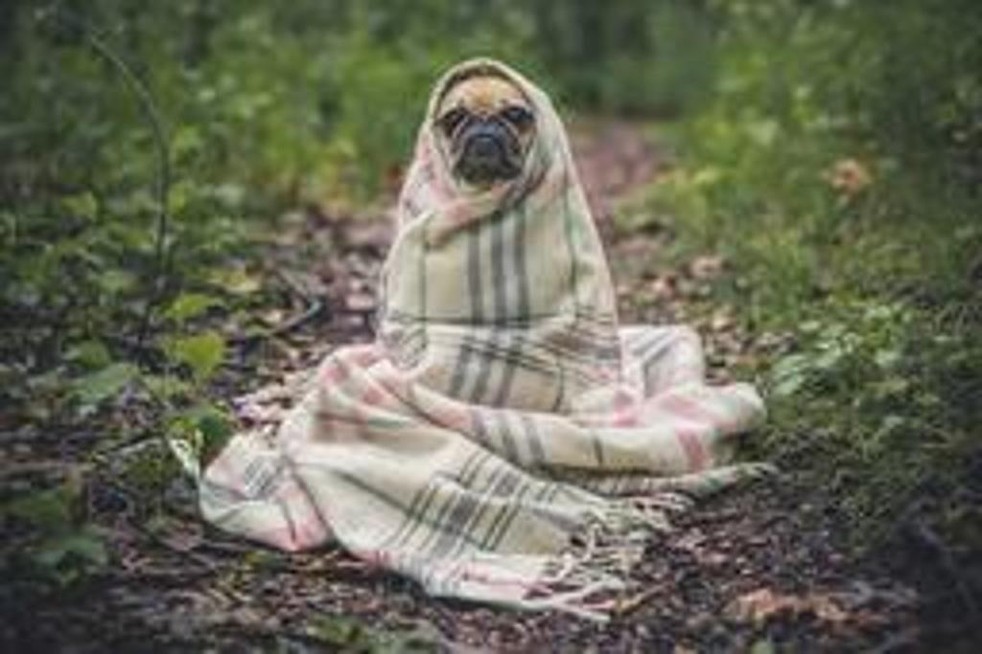
This is the low-resolution case from the list above, run through the same pass this page uses. The original is 245×163 pixels: about what a picture ends up as after it has been saved and re-saved through a few chat apps. The result is 980×652: four times larger on each side, with the fur, the eye and the whiskers rebuilt rather than stretched.
The same arithmetic applies to your own pictures. A 640×480 phone photo from 2009 comes back at 2560×1920, which is big enough to fill a modern screen or print at postcard size. A 1200×800 photo that looks soft on a laptop comes back at 4800×3200. The free ceiling is 8000 pixels on the long side: more than a photo lab asks for an A3 print.
Limits
Everything the tool will and will not take, for every tier: free, the free monthly e-mail pass, and a paid pass.
- Formats. JPG, PNG, WEBP, HEIC/HEIF (the iPhone format), TIFF, BMP and GIF. There is nothing to convert first. RAW camera files are not read, so export a JPG or TIFF from your photo app before you upload.
- File size. Up to 99 MB and roughly 45 megapixels per photo, and 800 MB for a whole batch. That is a lot more headroom than most online deblurrers allow: 12 MB is a common ceiling elsewhere.
- How many at a time. 5 photos on the free tier, or 10 once Studio mode unlocks after you have spent ten minutes on PicReviver. The free monthly e-mail pass raises that to 100 photos per batch, and a paid pass (€5 for 30 days, or €3 for 24 hours) to 1000 photos in one go.
- How big the result gets. Free: the photo is fitted to 2000 pixels on the long side before the AI pass, and the result comes back at up to 8000 pixels. E-mail pass: 2500 px in, 10000 px out. Paid pass: 3000 px in, 12000 px out. A pass buys volume and a higher ceiling, not a better result: every tier runs the same model at the same quality.
- Where your photo goes. Not into your browser. Rebuilding detail this way needs a graphics card, so your photo is processed on our own servers. The upload is deleted the moment it has been processed, and the finished file is wiped within 45 minutes: the same on the free tier, the e-mail pass and a paid pass. Nothing is shared or used to train anything.
- What it will not do. No account, no watermark and no trial, but no miracles either: it will not turn a face that is a smear of six pixels into the real person, undo a deliberate privacy blur, or read text that has been blurred away.
Related tools
PicReviver is one restorer with several doors. If your photo has a slightly different problem, one of these pages is the shorter route:
- Sharpen a photo, for an image that is nearly right and just needs more bite in the edges.
- Upscale an image, when the picture is sharp enough but too small, up to 4× larger.
- Fix a blurry photo, the main tool page for this same rebuild, with the quickest path from upload to download.
- Enhance a low-resolution photo, for thumbnails and old phone pictures, where size is the real problem.
- Restore old photos, scratches, fading and damaged faces on a scan of a print, which is a bigger repair than deblurring.
- Restore a face, for a portrait where the face looks wrong after sharpening, Restore Face rebuilds it more carefully.
Sources
- Lossy compression: Repeated lossy compression progressively lowers image quality
Common questions
How do I unblur an image for free?
Upload it to PicReviver and the model sharpens it automatically. The free tier covers up to five images per run and ten runs a day, with no account and no watermark. It works the same from a desktop or a phone, because the processing happens on our server, not on your device.
Is this different from a sharpen filter?
Yes. A sharpen filter only boosts edges that are already there. PicReviver's model redraws the detail the blur removed, based on what sharp photos look like, which looks far more natural. The flip side is that redrawn detail is a best guess: on a very blurry image it can differ from what was really there.
Does it work on screenshots, downloads and text?
A screenshot or a downloaded picture is just another image, so yes. Blurred text is the hard case. Lettering that is merely soft or too small often becomes readable again, but text that was blurred out on purpose is gone from the file, so what you would get back is a sharp-looking guess rather than the original words.
Does unblurring work on faces?
Yes, and a face is where you notice it most: skin texture, the hairline and the edges of eyes and lips are the first things to come back. A face that is soft or slightly out of focus usually ends up properly resolved. A face reduced to a handful of pixels does not: with that little to go on, the model draws a plausible face that may not look like the person.
What resolution do I get back?
Up to four times the original on each side. A 640×480 phone photo comes back at 2560×1920, and a 1000×1000 original can come back at 4000×4000 (16 MP). The ceiling on the long side is 8000 pixels on the free tier, 10000 with the free monthly e-mail pass and 12000 with a paid pass, and you choose the output size yourself before downloading, so you can also ask for something smaller.
Is the photo uploaded, and how long is it kept?
Yes. Rebuilding detail needs a graphics card, so your photo is processed on our own servers instead of inside your browser. The upload is deleted the moment it has been processed and the finished file is wiped within 45 minutes, and that is the same on the free tier, the free monthly e-mail pass and a paid pass. Nothing is shared or used to train anything.
Is it possible to unblur image without AI?
Only a little. A manual technique in an image editor (unsharp mask, deconvolution filters) can nudge a mildly soft photo, but it only pushes existing pixels around; it doesn't add texture that is missing. For more than that you need a model trained on millions of photos that redraws the missing texture, which is what this tool does automatically.
My background is blurry, not the subject: can this fix that?
Not quite the same problem. Photos with blurry background and a sharp subject are usually intentional (a wide-open aperture or portrait mode), and there's nothing broken to fix there. This tool is for the opposite case: the whole photo, subject included, came out soft.
Is this the same as PicWish's unblur tool?
Different service, similar job. PicWish is a well-known name for unblurring images online, typically with its own account and credit system for full-resolution downloads. This one skips that: free, no account, no watermark, up to five photos per run and ten runs a day on the free tier.
Does Google Photos unblur image results the way this does?
Google Photos has its own on-device Unblur suggestion under Editor → Suggestions, but it is limited to supported Pixel and newer Android phones: this page works from any browser on any device, running the reconstruction on the server instead.
Can ChatGPT unblur image files?
Not in the same way. Asked to unblur a photo, ChatGPT generates a new image that resembles yours, so faces, text and small objects can change and the result differs each time you ask. This tool works on the pixels of the file you upload and keeps its composition; the fine detail it adds is still a prediction, but it is anchored to what is in your photo.
Is this a free unblur image tool, or is there a catch?
It is the whole tool, free: five images per run, ten runs a day, a full-size download, no watermark and no account. A paid pass exists for bigger batches, but it only raises the limits. The model and the quality stay the same, so a free unblur photo run gives the same result as a paid one.
Is image unblur free for a whole batch?
Yes, up to five images per run on the free tier (ten once Studio mode unlocks), and ten runs a day.
Can I unblur my photo if I only have a copy from a chat app?
Yes, but find the original first if you can. Each time a chat app re-saves a photo it compresses it again and flattens fine texture, so the tool has less to rebuild from. If the chat copy is all you have, run it anyway and compare with the slider.